> ## Documentation Index
> Fetch the complete documentation index at: https://docs.objectionly.com/llms.txt
> Use this file to discover all available pages before exploring further.
# Invite an Admin
> Invite a teammate as an Admin with full workspace management access.
**Who can do this:** Admins
Invite a teammate as an Admin when they need to manage the workspace, including billing, integrations, settings, reps, calls, and team members.
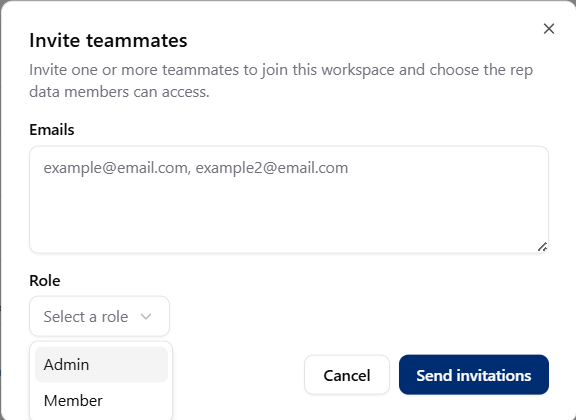 ## Invite an Admin
Open Team page
Start a new teammate invitation.
Use the email address they should use to join your workspace.
Select **Admin** as their role.
Select **Send invite**.
Admins have full access to your workspace, including billing. Only invite
people you trust.
## Invite an Admin
Open Team page
Start a new teammate invitation.
Use the email address they should use to join your workspace.
Select **Admin** as their role.
Select **Send invite**.
Admins have full access to your workspace, including billing. Only invite
people you trust.