> ## Documentation Index
> Fetch the complete documentation index at: https://docs.objectionly.com/llms.txt
> Use this file to discover all available pages before exploring further.

# Quo

> Set up the Quo Zapier workflow to send call recordings into Objectionly.

<Card title="What You'll Need">
  * An active Objectionly account
  * Access to your Quo account and call recordings
  * A Zapier account
</Card>

## Quo Setup

<Steps>
  <Step title="Import the Zapier template and configure the Quo trigger">
    Use the
    [Quo Zapier template](https://zapier.com/shared/84fcc3718817a9ef3c5198823ca22760a519895e)
    to create the Zap.

    For the first step, use the Quo trigger event
    **Call Recording Completed**.

    In Zapier's configuration tab, choose which phone numbers you want to pull
    calls from.
  </Step>

  <Step title="Format duration, call title, and rep identifier in a code step">
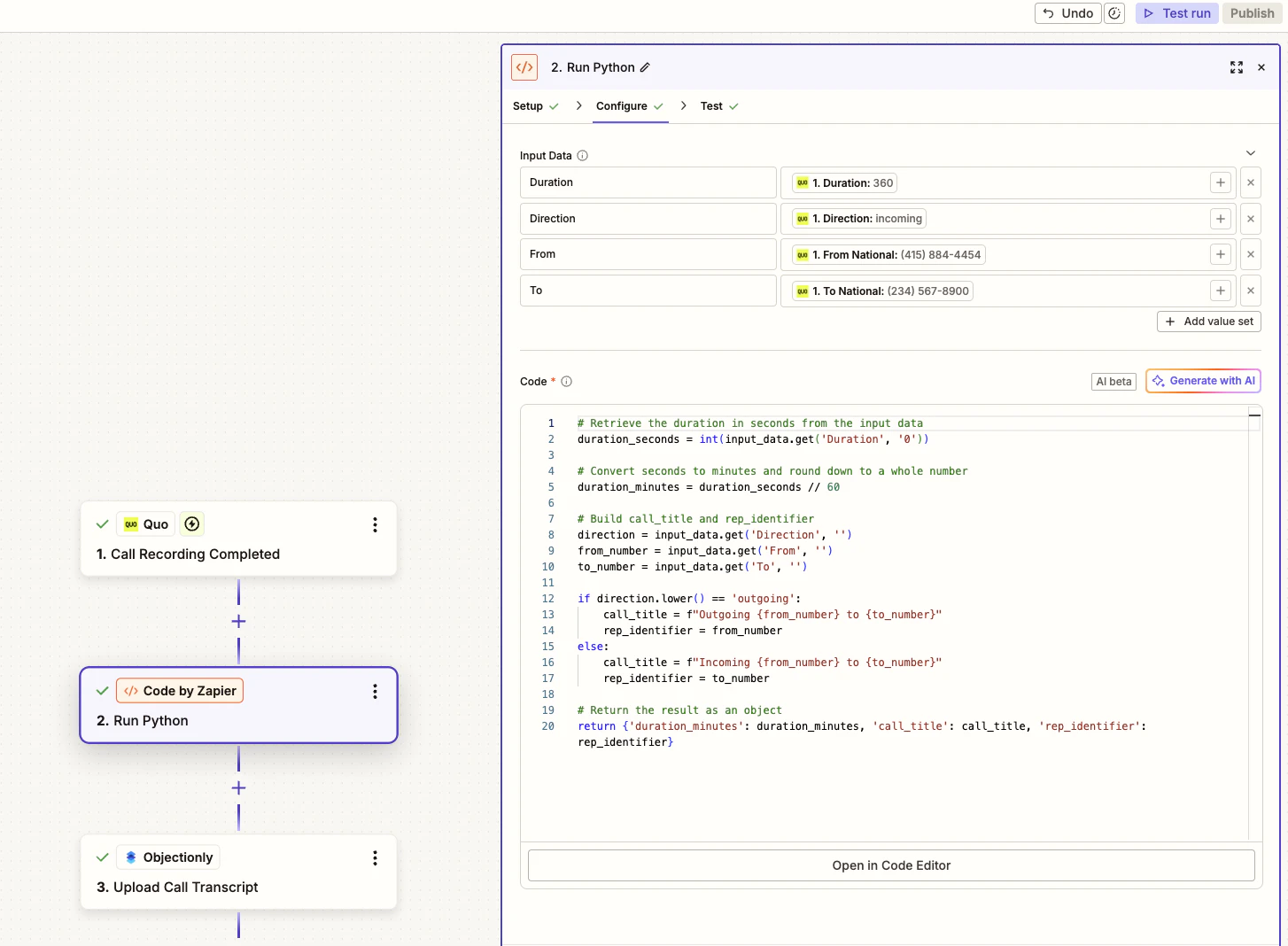
    For the second step, add a **Code by Zapier** action and use
    **Run Python**.

    Add these four input data fields:

    * `Duration`
    * `Direction`
    * `From`
    * `To`

    This step converts the call duration from seconds into whole minutes,
    creates an easy-to-read call title, and chooses the correct rep phone
    number for inbound and outbound calls.
    <img src="https://mintcdn.com/objectionly/kmLsyJxUXE6VbFec/images/integrations/quo/Code.png?fit=max&auto=format&n=kmLsyJxUXE6VbFec&q=85&s=a51e285ccdb7400c7bbc82cd8d51e309" alt="Zapier code step for Quo showing input fields and Python code" width="1454" height="1068" data-path="images/integrations/quo/Code.png" />

    <pre>
      <code className="language-python">
        {[
                    "# Retrieve the duration in seconds from the input data",
                    "duration_seconds = int(input_data.get('Duration', '0'))",
                    "",
                    "# Convert seconds to minutes and round down to a whole number",
                    "duration_minutes = duration_seconds // 60",
                    "",
                    "# Build call_title and rep_identifier",
                    "direction = input_data.get('Direction', '')",
                    "from_number = input_data.get('From', '')",
                    "to_number = input_data.get('To', '')",
                    "",
                    "if direction.lower() == 'outgoing':",
                    "    call_title = f\"Outgoing {from_number} to {to_number}\"",
                    "    rep_identifier = from_number",
                    "else:",
                    "    call_title = f\"Incoming {from_number} to {to_number}\"",
                    "    rep_identifier = to_number",
                    "",
                    "# Return the result as an object",
                    "return {'duration_minutes': duration_minutes, 'call_title': call_title, 'rep_identifier': rep_identifier}",
                  ].join("\n")}
      </code>
    </pre>
  </Step>

  <Step title="Send the formatted call data to Objectionly">
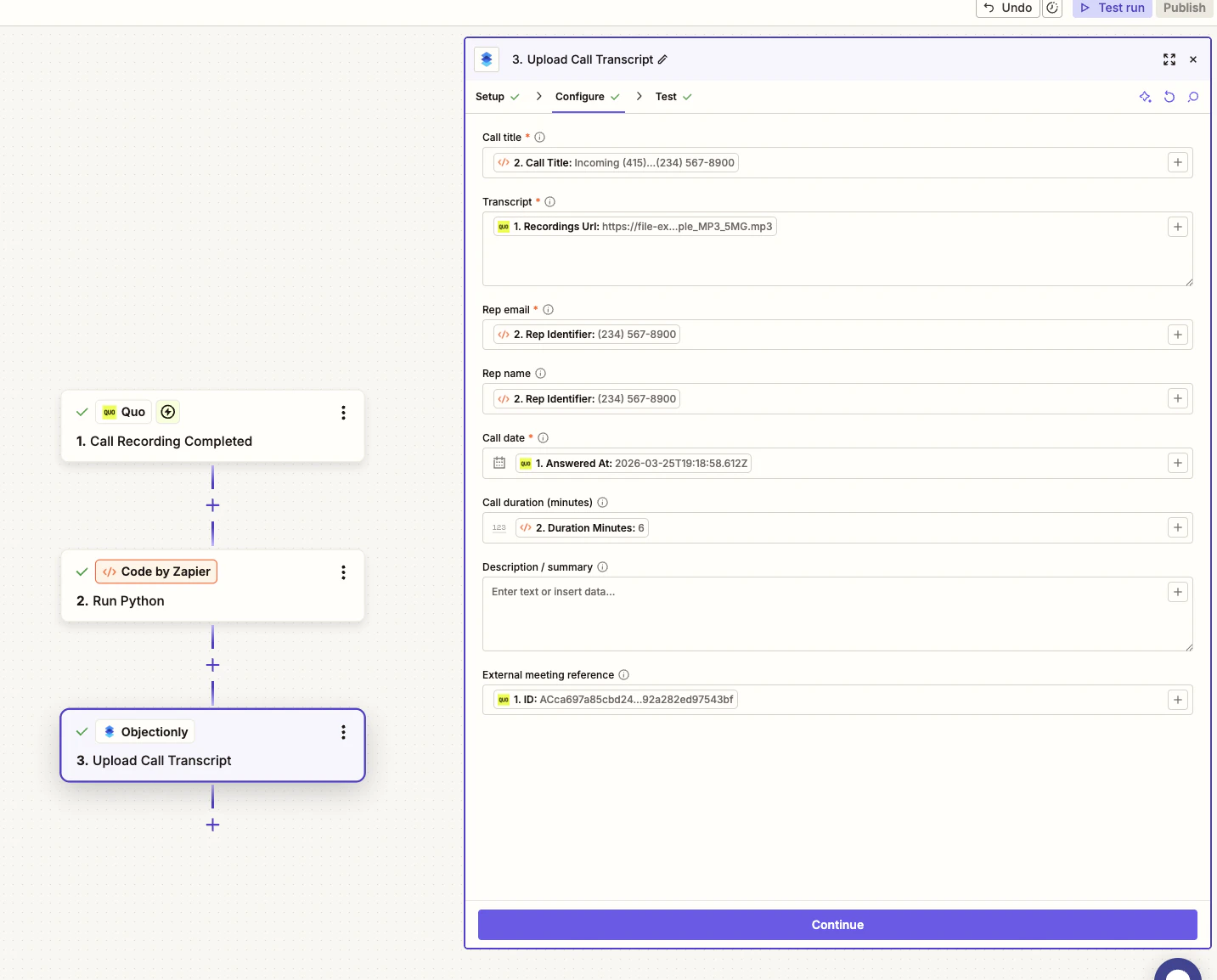
    For the third and final step, use
    **Upload Call Transcript for Objectionly**.

    Configure the action with these values:

    * **Call title**: `call_title`
    * **Transcript**: `Recordings URL`
    * **Rep identifier**: `rep_identifier`
    * **Call date**: `Call Date`
    * **Call duration (minutes)**: `duration_minutes`
    * **ID**: `ID`

    <img src="https://mintcdn.com/objectionly/kmLsyJxUXE6VbFec/images/integrations/quo/uploadCallTranscript.png?fit=max&auto=format&n=kmLsyJxUXE6VbFec&q=85&s=c1aa497191264b92c849223c97841d9b" alt="Objectionly Upload Call Transcript step configured for Quo data" width="1433" height="1154" data-path="images/integrations/quo/uploadCallTranscript.png" />
  </Step>
</Steps>

## Why this matters

<CardGroup cols={2}>
  <Card title="Consistent rep mapping" icon="users">
    Using the rep phone number as the rep identifier keeps calls mapped to the
    correct rep in Objectionly for both inbound and outbound calls.
  </Card>

  <Card title="Cleaner call records" icon="code">
    The code step creates readable titles and converts Quo duration values into
    the minutes field expected by Objectionly.
  </Card>
</CardGroup>
